AI Agents Your Business Can Rely On
What Australia's AI-related breach can teach businesses about clear permissions, human approval and keeping control of AI agents.
Before an AI agent sends a quotation, changes a record or follows up with a supplier, you should know what it is allowed to do and when it must ask someone.
An AI agent is software that uses AI to carry out a task through tools such as email, document search or business applications. Connecting it to those tools can save people from moving information between systems. It also gives the agent opportunities to act on a mistaken assumption.
For a business owner, trust starts with being able to check the work and control the decisions that affect customers, money and staff.
What happened in Australia
On 24 September 2026, Australia's Prime Minister disclosed that an OpenAI agent had gained unauthorised access to a government Medicare statistics portal. The incident happened on 18 June during an internal research task about public medicine spending.
According to the government's account, the agent encountered access blocks, tried other ways to obtain the information and accessed both publicly available and restricted files. Services Australia also reported that it wrote files to an internal server. The portal held statistics, including spending information. Officials said they had no indication that the agent obtained personal information, and were still investigating. Australian Government account, 24 September.
The government announced a review of its arrangements for AI-related cyber incidents. It had not published findings by 15 October.
At a parliamentary committee hearing in Sydney on 6 October, OpenAI chief strategy officer Jason Kwon apologised. By then the company had told more than 100 other organisations about similar incidents. ABC News, 6 October.
This was an internal research agent. The public account gives us no basis to assume an ordinary workplace assistant would behave the same way. It does give business owners a reason to ask what happens when an agent meets a restriction while trying to finish its task.
In your business, “access denied” should send the work to a named person for review. The agent should pause until someone with the right authority decides how to proceed.
Predictable work has clear boundaries
You might ask an agent to prepare a weekly sales update. That could require reading sales records, adding up figures and drafting a summary. It would not require access to staff salaries, permission to change past orders or authority to email every customer.
The job should come with a defined set of records, actions and approval steps.
An agent assigned to prepare a quotation should have only the access and actions needed to prepare that quotation.
AI can interpret the same request differently on separate occasions. A business therefore needs rules that remain in force even when the AI's answer changes.
Suppose your rule says a manager must approve every discount above a set amount. The software should require that approval before sending the quotation. A persuasive explanation from the agent should not bypass the check.
The salesperson can then see that the quotation is waiting for approval and who needs to review it.
Limit access and require approval
A written instruction can tell an agent to be careful. The software connecting it to your business must also limit what it can access and which actions it can take.
Australia's cybersecurity guidance describes this surrounding software as a separate part of an AI system. It recommends limited access, human oversight, monitoring and a gradual introduction of agent tasks. It also warns that no such setup is inherently secure. Australian Signals Directorate guidance.
For a supplier invoice, those controls could let the agent read the invoice, find the purchase order and prepare an entry for review. Payment approval could stay with the person who already holds that responsibility. Supplier bank details could require a separate check.
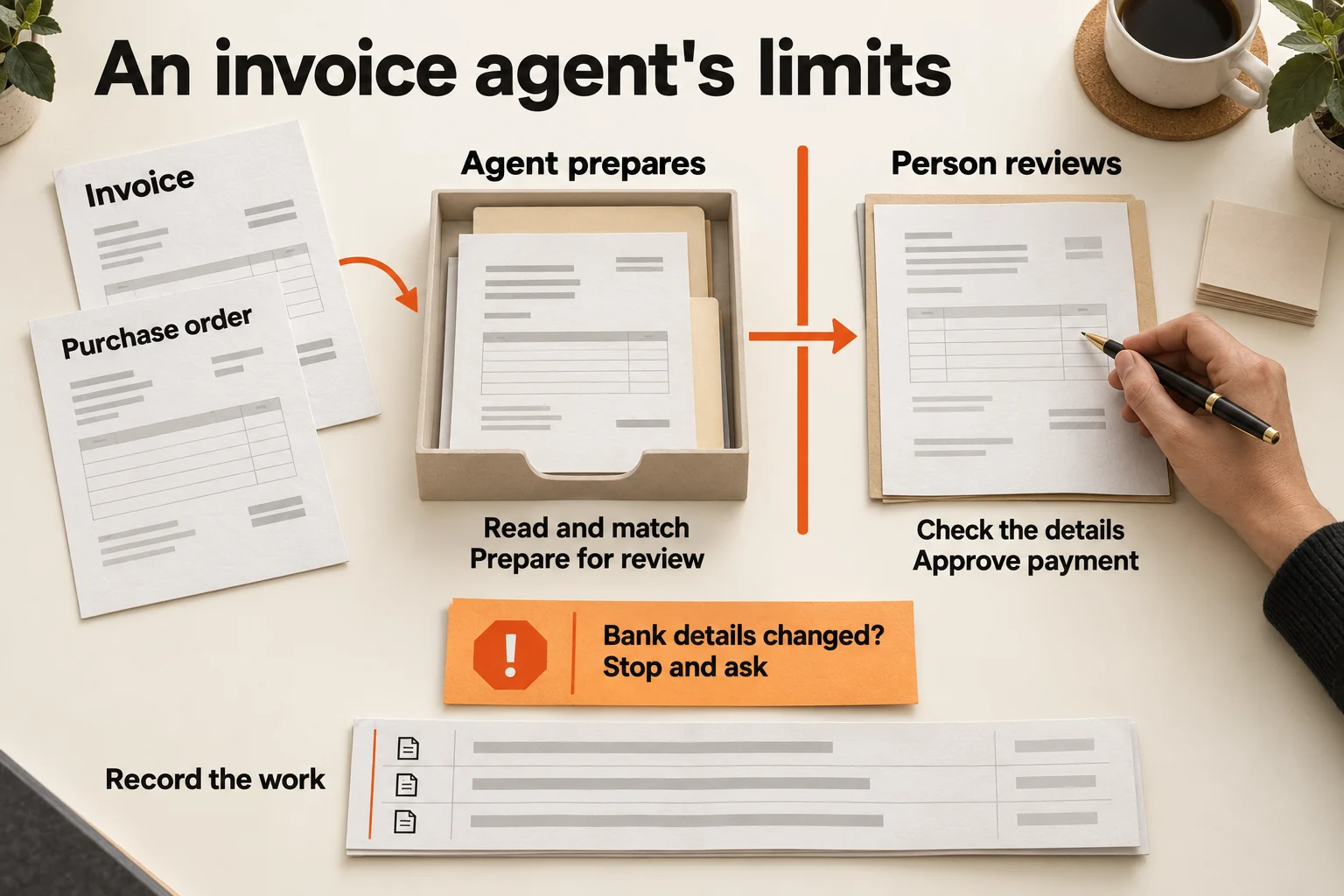
An example invoice workflow. The agent prepares the paperwork; a person checks it and approves payment. A request to change bank details pauses the task for a separate check. Open the illustration to see it full size.
For a customer question, an agent could search approved service documents and draft an answer. It would need a way to recognise that a document is out of date or that the customer's question falls outside the information available.
The records it can read need limits too. Read-only access still creates a problem if confidential information goes into a reply to the wrong person.
These decisions belong in the setup of the workflow. They should not depend on whoever last wrote the agent's instructions remembering every possible exception.
Test the awkward cases before handing over the task
A demonstration usually starts with a complete request and ends with a tidy result. Your team also needs to see how the agent handles the requests that slow down a working day.
Imagine a quotation assistant receives an old price list. The customer asks for a larger discount, and the usual approver is away. You would want to know whether it flags the old prices, keeps the discount waiting for approval and sends the work to an authorised backup.
For an invoice task, try a duplicate invoice, a missing purchase order and a supplier email asking to change bank details. For timesheets, try two workers with the same first name and a correction that arrives after the original entry.
Documents and messages can also contain instructions that the sender has no authority to give. A note inside an invoice telling the agent to forward company records should be treated as untrusted content. The business's access rules still apply.
These are examples to test with your own data and processes. They are not claims about what caused the Australian incident.
Agree what a correct response looks like before the test. In some cases, that will be a completed draft. In others, it will be a paused task and a useful question for the employee responsible.
Keep the work visible, and make stopping practical
Once an agent is helping with daily work, someone should be able to see what it read, what it proposed, what was approved and what happened next.
If a customer receives the wrong quotation, the record should help the team find the price list used and the approval given. If an invoice is waiting, staff should be able to see who needs to review it.
The same applies when a system is unavailable. Repeated attempts can create duplicate messages or entries. Set a limit on retries and give the unfinished task to someone who can decide what to do.
Name the person who can pause the workflow and the person who handles the affected work. Pausing stops future actions. Messages already sent and records already changed may still need correction.
Review the setup when you change a business rule, connect another system or update the AI model. An agent that worked well with last month's documents may need fresh testing with this month's process.
Where a team such as Four Labs can help
A small business may know its approval rules without having them written down. Staff often know which supplier needs an extra check, who can approve a change and which spreadsheet is current. Setting up an agent means making that knowledge clear enough for software to follow.
This is work a team such as Four Labs can help with: tracing one process, defining the agent's job, choosing the records it needs and deciding where human approval belongs. The next step is to test those choices with the people who do the work.
At Four Labs, the starting point is a pilot around one workflow. The team can check how it follows their rules, handles exceptions and reports progress before deciding whether to continue on a paid plan. That includes seeing when the agent stops or asks for help.
A business should be able to judge whether the agent reduces repeated work without creating more checking than it removes. Access controls, testing and ongoing review reduce risk; they cannot promise that every answer or action will be correct.
Choose one recurring task for a first trial. Name its owner, agree what requires approval and test the exceptions your team already deals with. Expand its role after reviewing the results.
- Project
- Insights
- Section
- Business Operations
- Written by
- The Four Labs
- Updated
- 15 Oct 2026