Business Operations / 5 min read
From WhatsApp Messages to Business Records
A timesheet, invoice or product enquiry still needs work after it arrives on WhatsApp. How AI could help prepare records for your team to check.
In many small and medium businesses, WhatsApp is part of the working day before anyone opens the accounting software.
A supervisor sends a site update, a customer asks about a part, or a supplier forwards an invoice. An employee needs a payslip. A manager asks whether a quotation has been approved.
People use WhatsApp to ask questions, share evidence and request work, whether they are at a desk, on a vessel or moving between sites.
The message reaches someone who can help. That person still has to check the details, find the right records and enter the information elsewhere.
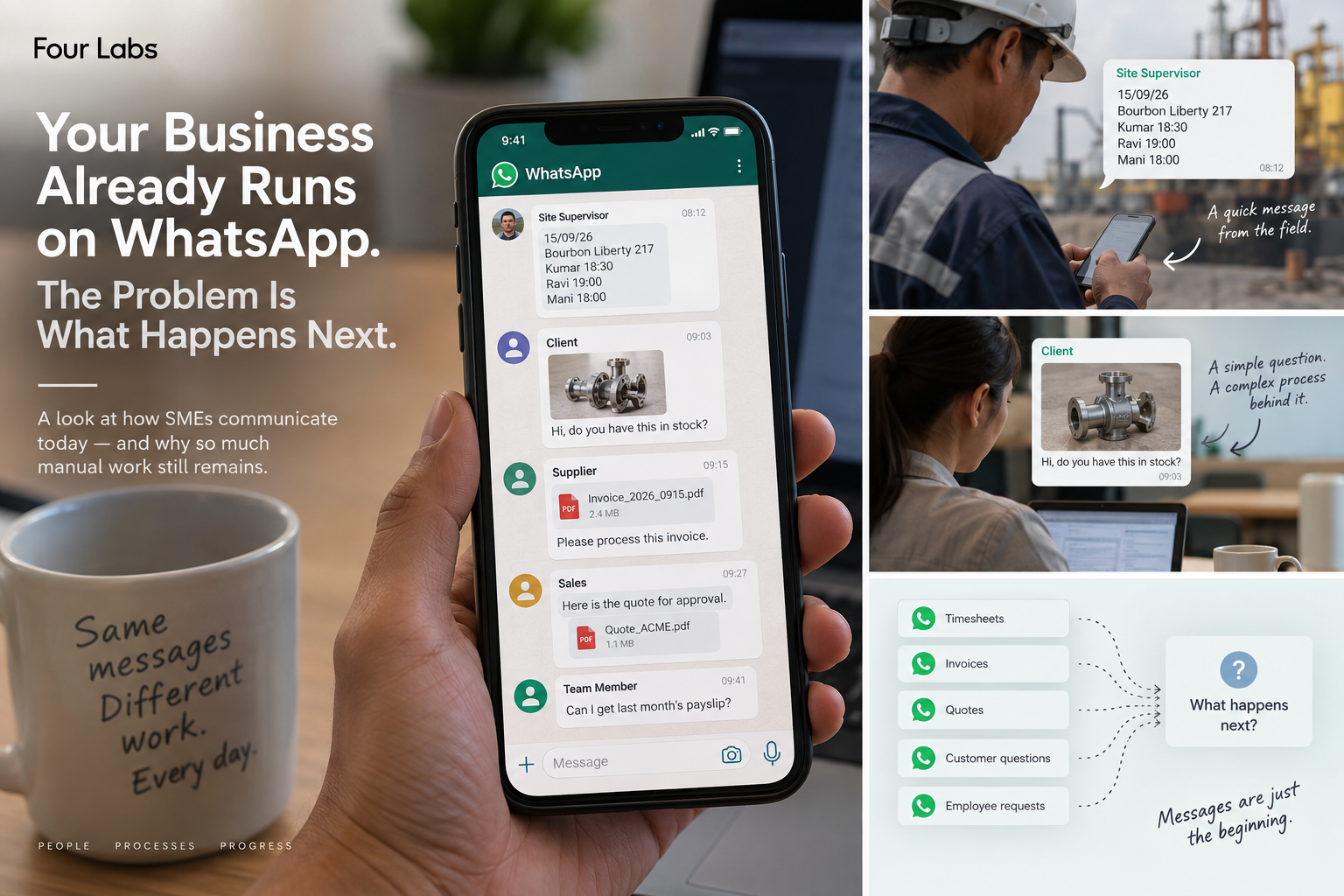
Examples of requests that arrive through WhatsApp. Editorial illustration; select the image to view it at full size.
The work behind a short message
Consider this illustrative update from a site supervisor:
15/09/26
Bourbon Liberty 217
Kumar 18:30
Ravi 19:00
Mani 18:00
Someone familiar with the team immediately recognises a work-time update. There is a date, a vessel or worksite, three workers and their finishing times. The sender does not need a form to make the message understandable.
Someone in the office still has to:
- Confirm the work date, including the date convention being used.
- Match the names to the correct worker records.
- Identify the vessel or worksite in the business's records.
- Extract each finishing time.
- Check for missing details, duplicates or inconsistencies.
- Enter the validated information into a spreadsheet or another system.
- Acknowledge the update or ask the sender to clarify something.
Finishing times alone do not establish hours worked. That may require start times, breaks and the applicable shift rules. A familiar name may belong to more than one worker. A correction sent later needs to reach the same record.
The message takes seconds to send. The work that follows can take minutes, particularly when the person handling it has to interrupt another task.
Repeated throughout the day, those steps add up. Someone also has to remember which updates are still waiting for a response.
Different businesses, the same pattern
The same sequence appears in many forms:
- Customer product photo: search a catalogue, narrow down possible matches, check inventory and prepare a response. A photograph may begin the search, but dimensions or specifications may still need confirming.
- Timesheet message: understand the names, date, site and time information, resolve gaps, then update a spreadsheet or database.
- Supplier invoice: identify the invoice and supplier, check whether it has already been recorded, enter accounting information and route it for approval.
- Customer question: search company documents, find a current answer and respond in language the customer can use.
- Manager request: open several systems, retrieve the relevant numbers, reconcile differences and send an update.
- Quotation: send it to the right reviewer, obtain approval, check the agreed version and respond to the customer.
In each case, the conversation starts the work. A person then carries the information between the conversation and the systems where the work is recorded.
Preparing a record from a message
A timesheet message could become a set of structured draft records, with uncertain names or missing times highlighted for review. An invoice could be identified and routed to the person responsible for that supplier. A product photograph could start a catalogue search and return possible matches for an employee to check.
A business question could retrieve information from approved company data, with a reference to the document behind the answer. A request could be directed to the appropriate employee, software system or AI assistant, depending on the task and the access it requires.
The employee should be able to report that today's work has finished through the chat they already use.
The workflow would still need to handle ordinary complications: incomplete messages, attachments, corrections and questions that cannot be answered confidently. Asking one useful follow-up question could be more valuable than creating a neat but incorrect record.
Connecting the tools a business already uses
SMEs often already have a working collection of tools: WhatsApp, spreadsheets, accounting software, shared folders, email, industry-specific systems and internal databases.
Each may serve a purpose. A spreadsheet might accommodate an unusual pay arrangement. An industry system might hold years of job history. Replacing everything at once can demand time, money and operational disruption that the business cannot easily absorb.
Automation could begin with one handoff between these tools: preparing timesheet entries for review, finding a document or assembling the information needed to approve an invoice. The team could check whether it leads to fewer repeated steps, fewer missed requests and less time spent looking for information.
What we are exploring at Four Labs
At The Four Labs, we are exploring how AI could help turn messages into checked business records.
These ideas are part of Four Labs Operator, a product we are still designing, testing and building. The examples in this article describe possibilities we are exploring.
We start by tracing a request: what arrives, who handles it, what they check and where the information goes. Those details help us decide which steps AI could help with.
Decide who can access records and approve changes
A message can be ambiguous, out of date or sent by someone who should not have access to the requested information.
Being able to send a message must not automatically grant permission to retrieve payroll records, change an invoice or approve a quotation.
Start with a repetitive task where a mistake is easy to catch and correct. Read-only access lets a system find information or prepare a suggested response before it can make changes.
Role-based permissions should determine who can request what. System access should be limited to the records and actions needed for the task. Human approval should remain wherever the business requires it, especially for decisions involving money or sensitive information.
There should also be clear records of what the system received, what it proposed, what was approved and what it eventually did. If it cannot identify the correct worker or source document, it should ask for help.
Before expanding automation, check completed records against the original requests. Review mistakes with the team and confirm that a person can stop or correct an action.