Psychometry, MCP and AI That Can Act for You
Our new Workstyle tool lets you connect your AI assistant to help with your assessment. It is a practical example of the direction we are building towards with Operator.
We have released Workstyle, our free psychometry tool. You can answer its questions yourself, or connect your AI assistant and ask it to help you complete the assessment and understand the results.
With your permission, the assistant can save answers in Workstyle on your behalf. You can see those answers in the tool, change them and decide whether the report describes you fairly.
An AI conversation can now lead to work inside another application. Workstyle gives business owners a small, personal example of what that feels like.
Start with how you work
Workstyle uses 50 public-domain IPIP questions to describe five broad personality traits: extraversion, agreeableness, conscientiousness, emotional stability and intellect/imagination. The questions give you a way to reflect on habits such as planning, social energy and how you respond under pressure.
The results are for personal reflection. They are not a diagnosis, a hiring assessment or a prediction of how well someone will do a job. Your own judgement and experience belong in the conversation.
The scoring follows fixed rules. AI can help you think through a question or write an explanation of your results, but its explanation does not change how the scores are calculated.
You can use the assessment without AI. AI-assisted answers are not a validated substitute for completing the self-report yourself. If you choose to connect an assistant, start with information you are comfortable discussing and correct it when it gets something wrong.
Give your assistant a task and permission to do it
The connection uses MCP, the Model Context Protocol. MCP is an open standard through which AI applications can discover and use tools supplied by other software. In Workstyle, those tools let the assistant read the assessment, submit answers and prepare a report.
You start the task in your AI app. Workstyle cannot browse your chat history or retrieve your assistant's memories. The assistant works with the context available in the conversation you choose, and Workstyle receives the answers or report text it submits.
During connection, you choose what the assistant may do:
- Discuss your questions and results without saving changes.
- Suggest answers for you to review before saving.
- Save or replace answers on your behalf when you allow it.
- Draft an explanation of your results with separate report permission. You still review and accept that text before it appears in your printable report.
You might ask it:
Help me answer the Workstyle questions using the work examples I share here. Ask me about anything uncertain. Let me review your suggestions before saving.
If you want it to save answers directly, choose that permission when connecting. A chat instruction cannot give the assistant more access than you granted in Workstyle.
The saved answers show where AI helped. You can edit them later or disconnect the assistant. Disconnecting stops future access; it does not undo answers you already saved or remove copies held by your AI provider.
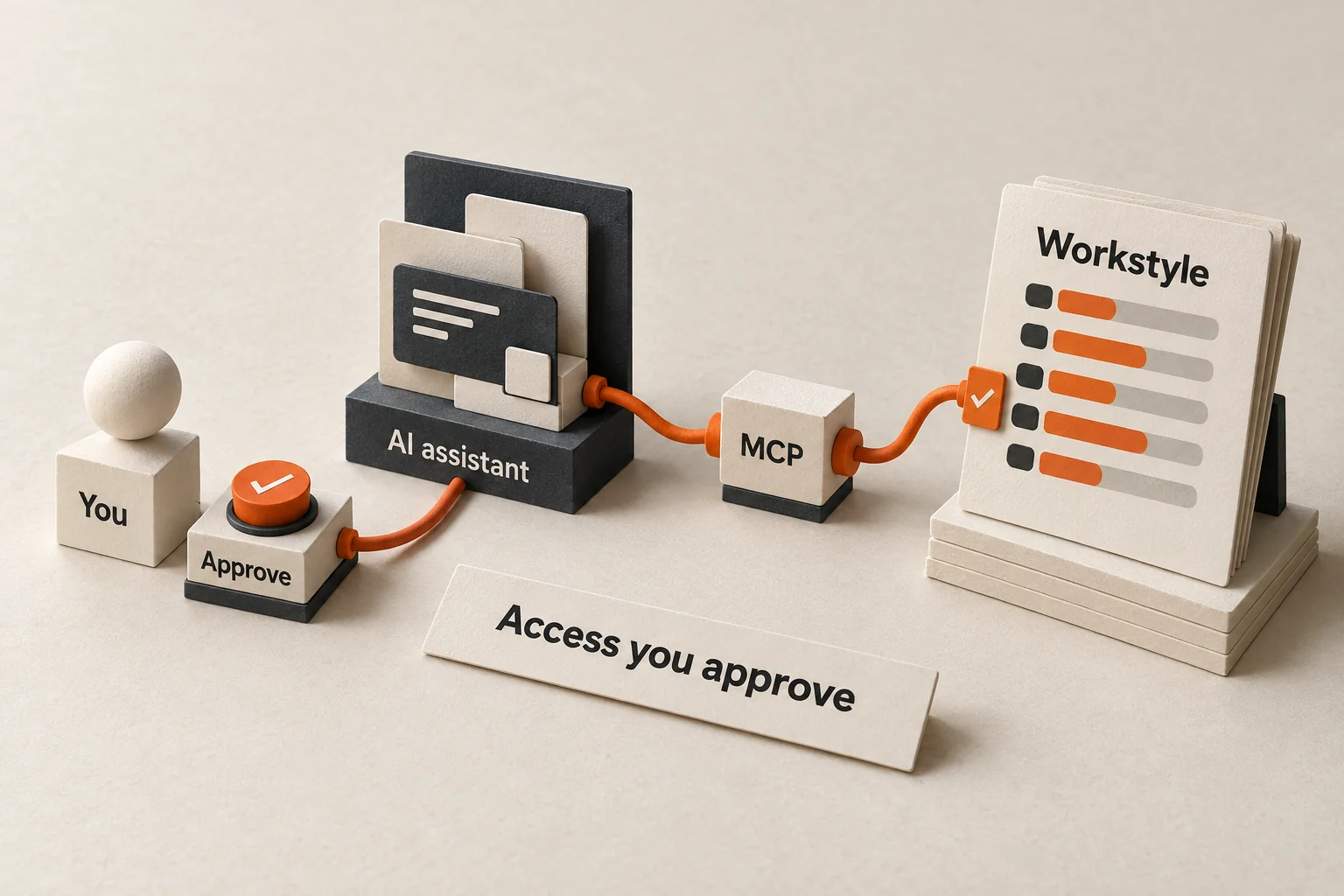
An AI-generated editorial illustration of the connection. You approve access, the assistant calls a tool through MCP, and Workstyle checks whether the action is allowed. The model is conceptual, not an app screen.
Business software will need to work with your AI
We expect more people to bring an AI assistant they already use into their business software. They will want to explain a job once and let the assistant carry it through the applications involved.
Consider a supplier sending a revised delivery date. A business owner could ask an assistant to find the order, compare the new date with the job schedule and prepare an update for the customer. With the right connections and permissions, it could also save the revised date in the job record.
That is an illustrative workflow. Each system would need a supported connection. The business would need to decide who can change the date, what evidence to keep and who approves the customer message.
MCP provides a common way to connect tools. The application still has to enforce access, validate changes and report what happened. A successful connection alone cannot tell you whether the assistant found the right order or understood the supplier correctly.
Workstyle already makes that separation visible. Permission to read results is different from permission to change answers. Permission to draft a report still leaves acceptance with the person. A business needs the same clarity around its records and decisions.
How this connects to Operator
Operator is the business workflow product we are building at Four Labs. AI interprets a request and prepares the work. Tested code applies the business's rules, calculations and permissions. People answer questions, resolve exceptions and approve the steps that need them.
For example, a message about a crew's finish time needs to become a record against the correct workers, job and date. Payable hours should follow the configured rules. If the job name is ambiguous, the request should wait for an answer. After saving, the system should read the record back and check it.
Four Labs uses Operator Studio internally to design and test these workflows. Each client runs its own Operator installation with its own database, in the office or on a hosted server. The team uses its workspace and connected channels to follow the work.
Workstyle's MCP connection is available today. Bringing a client's own AI assistant into Operator is part of the direction we are building towards. The Workstyle launch gives us a working example of delegated access; each business workflow still needs its own connections, rules and tests.
We want a business owner to be able to connect intelligence to a defined job, give it enough authority to help, and inspect the result. That starts with specific actions such as updating a record, preparing a reply or asking the right person for a missing detail.
Try the connection
Open Workstyle and save or reopen your profile. Then use the AI connection guide on a computer. The guide includes setup for Codex and Claude Code, with help for ChatGPT and Claude in the browser. Availability depends on your AI app, plan and workspace permissions.
Keep your recovery code in Workstyle. The connection opens a browser consent page, so you do not need to paste the code into an AI chat.
Begin with review before saving. Ask your assistant about one question, check its reasoning against your experience, and see how the proposed answer appears back in Workstyle.
- Project
- Insights
- Section
- AI in Practice
- Written by
- The Four Labs
- Updated
- 19 Oct 2026